How to Monetize a Newsletter: 6 Ways to Make Money, Even From a Small List
You don't need 10,000 subscribers to earn your first dollar. Here's which way to make money fits your list size, what each platform takes, and a simple plan for your first $100.
Heads-up: some links on this page are affiliate links. If you sign up through them, we may earn a commission at no extra cost to you. It doesn't decide our picks. Here's how we review.
"I have 200 subscribers. Can this newsletter make any money yet, or am I supposed to wait until I hit 10,000?"
You don't have to wait. Sponsors and paid tiers usually need a bigger, steadier audience, but affiliate links, a small service or a $15 template can work with a few hundred readers who trust you. The trick is matching the method to your list size.
This guide shows how to monetize a newsletter step by step: a ladder of six income methods by list size, what each platform takes from every dollar, simple math you can redo with your own numbers, and a plan for your first $100.
Quick answer: where to start
- 1
beehiiv Best if the newsletter is the business
Free up to 2,500 subscribers; Lite $59/mo at 1,000 (monthly billing)
Ad Network, paid recommendations and paid subscriptions on paid plans, with a 0% take on subscriptions and digital products, per beehiiv.
- 2
Systeme.io Best for selling your own product on $0
Free up to 2,000 contacts; Startup $17/mo
Checkout, funnels, email and one course in a free account, and Systeme.io says it charges no transaction fees.
- 3
Teachable Best for a full course
Starter $39/mo (7.5% fee); Builder $89/mo (0% fee)
A dedicated course platform for when a smaller product has already sold. 7-day free trial.
Prices checked Oct 2026. Plans change, so please confirm on each vendor's site.
On this page
- The newsletter monetization ladder by list size
- How we put this guide together
- 1. Affiliate recommendations: the easiest first dollar
- 2. Services and coaching: fewest readers needed
- 3. Sell your own digital products and courses
- 4. Paid recommendations and referral programs
- 5. Sponsorships and ad networks
- 6. Paid subscriptions
- Where beehiiv fits
- Your first $100 plan
- FAQ
- The bottom line
The newsletter monetization ladder by list size
Here's the order we'd suggest climbing, from "works with a tiny list" to "works once readers rely on you."
| Method | Starts to make sense | Effort | Tools that support it |
|---|---|---|---|
| Affiliate recommendations | From your first issue | Low | Any platform |
| Services or coaching | From your first issue, even with a handful of readers | Medium to high (your time) | A booking or payment link; Systeme.io checkout |
| Your own digital product | Once readers keep asking the same question | Medium to make, low to sell | beehiiv (every plan), Kit Free, Systeme.io Free |
| Paid recommendations | Once you're on a paid plan and sending regularly | Low | beehiiv paid plans, Kit Creator and up |
| Ad network | Once you're on a paid plan and sending regularly | Low | beehiiv paid plans |
| Direct sponsorships | Once you can show steady opens and clicks | Medium (pitching and reporting) | Any platform; Kit lists sponsorship matching on Creator and Pro |
| Paid subscriptions | Once readers clearly value your issues and you can deliver extra on schedule | High (ongoing) | beehiiv Lite and up, Kit (every plan), Substack |
| A full course | After a smaller product has sold | High to make | Teachable, Systeme.io |
The "starts to make sense" column is our rule of thumb, not a platform requirement. We don't quote typical earnings for any method, because there isn't an honest single number: income depends on your niche, your price, and how much your readers trust you.
How we put this guide together
We read each platform's pricing page and help center for its earning features and the fee each one takes. Any dollar figure that isn't a plan price or published fee is labeled as an illustration. We didn't run paid newsletters for this guide. Our method is on how we review.
1. Affiliate recommendations: the easiest first dollar
You recommend a tool, book or product you actually use, and earn a commission when a reader buys through your link. No inventory and no minimum list size.
- One recommendation per issue, in context. "The template I used to plan this week's issue" beats a list of ten links.
- Products that solve your newsletter's problem. A budgeting newsletter recommending a budgeting app reads as help, not an ad.
- Recurring commissions where you can find them. Some software programs pay monthly while the customer stays.
Illustration (not a typical result): if 1,000 readers see a recommendation, 3% click (30 people), and 1 in 10 of those buys a product that pays a $30 commission, that's 3 sales × $30 = $90. Swap in your own click rate and the program's real commission.
2. Services and coaching: fewest readers needed
With a small list, a service is often the quickest route to real money, because one buyer can be enough. If your newsletter teaches something, some readers will want you to do it for them or with them.
- A one-off review or audit: "I'll review your Etsy listings and send three fixes."
- A 45-minute call: a focused coaching session on one problem.
- Done-for-you work: writing, design, setup or editing in your area.
Mention the offer in a short P.S. with a booking or payment link. You don't need a sales page to start.
Illustration: one $100 audit sold to one reader is your first $100. That's the whole math.
The trade-off is time: a service earns only while you work. Early clients show you which problems come up again and again, and those answers become products.
3. Sell your own digital products and courses
A digital product is the natural next step after your free tips: a template, checklist, printable, mini guide or short course that solves the next problem. You make it once and sell it to every new subscriber who needs it. For product ideas, pricing and a launch plan, see our guide on how to sell digital products.
The signal to look for: readers reply with the same question three or four times. That question is your product.
Where to sell, and what each one takes
- beehiiv: lists digital products on every plan, Free included. beehiiv says it "takes 0% of your paid subscription and digital product revenue," minus Stripe's 2.9% + $0.30 per transaction.
- Kit: lists selling digital products on its free plan, up to 10,000 subscribers. Kit's help center lists 3.5% + $0.30 per USD sale.
- Systeme.io: the free plan covers 2,000 contacts, a checkout, 3 funnels and 1 course, and Systeme.io says there are "No transaction fees." The free plan caps you at 500 students, 1 tag, 1 automation rule and 1 workflow, so it is fine for testing but too limited for a real email funnel. Students are unlimited on paid plans, which start at $17/mo.
- Teachable: for a full course. Starter is $39/mo with a 7.5% transaction fee. Builder is $89/mo with 0% transaction fees ("Standard processing fees may still apply"). There's a 7-day free trial. Our Thinkific vs Teachable comparison covers the course platform choice in depth.
Illustration: if 2% of 1,000 readers buy a $15 template, that's 20 sales and $300.
- On beehiiv, Stripe takes 20 × ($0.435 + $0.30) = $14.70, so about $285.30 reaches you.
- On Kit Free, the listed fee is 20 × ($0.525 + $0.30) = $16.50, so about $283.50 reaches you.
At this size the platform barely changes the result. What matters more is whether the product solves a problem readers already told you about.
4. Paid recommendations and referral programs
These two sound alike but do different jobs. Paid recommendations pay you. Referral programs grow your list, which feeds every other method on this page.
Paid recommendations (formerly beehiiv Boosts)
beehiiv's help center says Boosts are now called "Paid recommendations." Another newsletter offers a fixed amount for each verified subscriber you send them, and you recommend it to your readers. Here's what beehiiv's FAQ lists:
- Plan: paid recommendations need a paid beehiiv plan. Free recommendations, where newsletters suggest each other at no cost, are available on every plan.
- Fee: beehiiv takes 20%, already built into the price you see. Its own example: a $2.50 offer shows publishers $2.00 per subscriber.
- Payouts: earnings go to your beehiiv Wallet. beehiiv requires Stripe Identity Verification and a Stripe Express account to withdraw.
- Formats: Email Boosts and Direct Links have been retired for new offers.
Illustration: at the $2.00 per subscriber in beehiiv's example, sending 50 verified subscribers to another newsletter would earn $100. Offers vary, so check each one before you apply.
On Kit, "Paid Recommendations" are listed from the Creator plan, described as a way to "get paid to promote other creators or newsletters."
Referral programs
A referral program rewards readers for sharing, say a bonus guide after three referrals. It doesn't pay you directly, but more readers raise every other income line. Kit's pricing page lists a "Newsletter referral system" on Creator and Pro. The free version: a "Forward this to a friend" line in every issue.
A paid recommendation still carries your name, so only recommend newsletters you'd read yourself.
5. Sponsorships and ad networks
A sponsor pays to be featured in your issue. You can find sponsors two ways: through an ad network that matches you with advertisers, or by pitching brands yourself.
Ad networks
beehiiv's Ad Network, per its FAQ, is "available to anyone on a paid plan, who is actively sending on beehiiv," and it doesn't list a subscriber minimum. Here's how it works:
- Pay models: advertisers set either CPM (per unique opens) or CPC (per unique clicks on sponsored links).
- Payouts: "on the 20th of each month for the prior month's ad units," into your beehiiv Wallet.
- Requirements: a Stripe Express account and Stripe Identity Verification. beehiiv doesn't support PayPal or Wise for these payouts, and publishers in countries Stripe doesn't support can't receive them.
- Revenue split: the FAQ we read doesn't state what share beehiiv keeps, so we can't tell you.
beehiiv's pricing page lists "Ad monetization" on Lite and up, not on Free.
Direct sponsorships
Pitching brands yourself takes more work but lets you set the price and choose the sponsors. Kit's pricing page lists "Newsletter sponsorships" on Creator and Pro, saying it matches you with brands and you approve every ad. beehiiv also lists direct sponsorships as a separate feature, and its Ad Network FAQ mentions it alongside its Pro and Enterprise plans, so check the plan before you count on it.
Sponsors usually want a clear audience, steady open and click rates (not only subscriber count), and a one-page media kit with your readers, numbers, placement options and price.
Many sponsorships are priced per 1,000 opens (CPM). Illustration: if you and a sponsor agreed on $25 per 1,000 opens and your issue got 800 opens, the placement would be 800 ÷ 1,000 × $25 = $20. Small, but repeatable, and the price rises with your audience.
6. Paid subscriptions
You keep a free issue and offer paying readers something extra: a second issue, deep dives or the full archive. It asks the most of you, because paying readers expect that extra on schedule.
Illustration: if 2% of 1,000 readers paid $5 a month, that's 20 paying readers and $100 a month. Here's what reaches you on three platforms (card fees on $5: 2.9% is $0.145, plus $0.30):
| Platform | Platform cost | Fees on $100 | About what you keep |
|---|---|---|---|
| beehiiv Lite (1,000 subs) | $59/mo plan, 0% take | $8.90 Stripe | $32.10 |
| Substack | $0 plan, 10% of revenue | $10 + $8.90 Stripe | $81.10 |
| Kit Free | $0 plan | $9.50 listed fee (3.5% + $0.30) | $90.50 |
Prices shown are monthly billing at the time of our last check. Please confirm on the official pricing page before you buy.
The honest takeaway: at 20 paying readers, beehiiv's flat plan costs more than a percentage fee. Substack says it keeps 10% of paid subscription revenue, with Stripe's fees on top; its help center also lists a Stripe Billing fee for recurring payments, so the real figure is slightly lower. For Kit we treated the listed 3.5% + $0.30 as the whole cost; we couldn't confirm whether card processing is added, so check Kit's payment settings.
beehiiv's flat price pays off as paid revenue grows. On a 1,000-subscriber list at $8 a month, it costs less than Substack's 10% from about 74 paying readers. The full break-even math is in beehiiv vs Substack, and the Kit comparison is in beehiiv vs Kit. Lite also unlocks the Ad Network and paid recommendations, so several income lines can share one plan price.
Where beehiiv fits
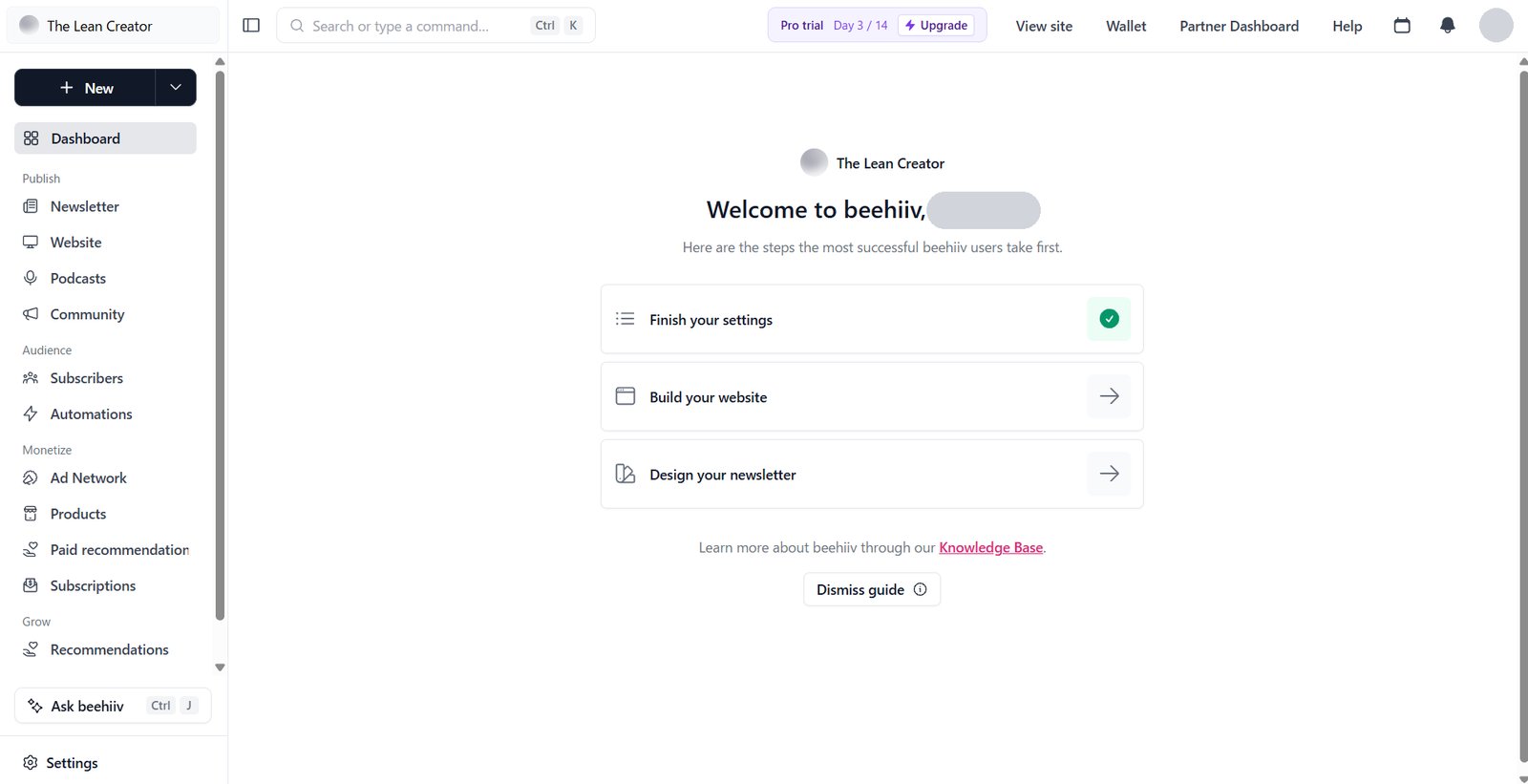
If the newsletter itself is your business, beehiiv puts most of the methods above in one place. In our account, the dashboard's Monetize menu lists Ad Network, Products, Paid recommendations and Subscriptions side by side. More detail in our beehiiv review.
beehiiv
Best for: Newsletter-first writers who plan to earn from the newsletterFree up to 2,500 subscribers · Lite from $59/mo
- Free plan
- Up to 2,500 subscribers; digital products and free recommendations included
- Earning from Lite
- Paid subscriptions, Ad Network, paid recommendations
- Revenue take
- 0% on paid subscriptions and digital products, plus Stripe's 2.9% + $0.30
- Lite, monthly billing
- $59 at 1,000 · $79 at 2,500 · $109 at 5,000
Lite starts at $59/mo billed monthly ($49/mo billed yearly) for up to 1,000 subscribers. beehiiv's pricing page loads on yearly billing, which is why $49 shows first.
Skip it if: you have only a handful of paying readers and don't want a monthly bill yet, or your main income will be a course sold through launch sequences.
What we like
- Ad Network, paid recommendations and paid subscriptions on one paid plan
- 0% take on paid subscriptions and digital products, per beehiiv
- Digital products and free recommendations on every plan, Free included
- Ad Network FAQ lists no subscriber minimum
Watch out for
- No paid subscriptions or ad monetization on Free
- Lite's $59/mo at 1,000 costs more than a percentage fee at small paid revenue
- Ad and paid-recommendation payouts need Stripe Express; no PayPal or Wise
- The Ad Network FAQ doesn't state beehiiv's share of ad revenue
Start your newsletter on beehiiv →Free up to 2,500 subscribers
Your first $100 plan
This is a plan, not a promise. It stacks the low-effort methods so you're not relying on any single one.
- Pick one affiliate product you already use. Join its program, read the terms on email links, and write one issue where it solves a real problem. Add a clear disclosure next to the link.
- Add a service P.S. to every issue: one offer, one price, one booking or payment link. One buyer at $100 covers the whole goal.
- Ask a reply question. "What's the hardest part of [topic] for you right now?" Keep a running list of answers.
- Turn the most common answer into a $10–$20 product. A template or checklist is enough. Sell it on the platform you already use, or on Systeme.io's free plan.
- Turn on free recommendations if your platform has them, and add a "forward this" line, so the list keeps growing while you sell.
- Once you're on a paid plan, apply to the Ad Network or one paid recommendation offer that fits your readers.
- Track what earned. After four to six issues, keep the method that brought in money and drop the one that didn't.
FAQ
How many subscribers do you need to monetize a newsletter?
There's no fixed number. Affiliate links and services can work from your first issue. beehiiv's Ad Network FAQ lists no subscriber minimum, but it needs a paid plan. Sponsors and paid tiers tend to make more sense once you publish steadily and can show engaged readers.
Can you make money from a free newsletter?
Yes. Affiliate recommendations, services, digital products, paid recommendations and sponsorships all work with a free newsletter. Paid subscriptions are the only method here that charges readers for the issues themselves.
Does beehiiv take a cut of what I earn?
beehiiv says it takes 0% of paid subscription and digital product revenue, minus Stripe's 2.9% + $0.30 per transaction. On paid recommendations it takes a 20% fee built into the offer price. Its Ad Network FAQ doesn't state an ad revenue split.
How much does Substack take from paid subscriptions?
Substack keeps 10% of paid subscription revenue, and Stripe's processing fees apply on top. Publishing a free newsletter on Substack costs nothing.
Do I have to disclose affiliate links and sponsors in my newsletter?
In the US, the FTC expects clear disclosure of paid placements and affiliate relationships, placed close to the link or sponsor message. Label sponsored sections and add a short affiliate note next to the link. This isn't legal advice; check the rules where you live.
What's the easiest way to monetize a small newsletter?
For most beginners, an affiliate link to a product you already use, plus a simple service offer in your P.S. Both need no extra platform features and can start with your next issue.
The bottom line
You can earn from a newsletter long before sponsors notice you. Start at the bottom of the ladder with an honest affiliate link and a small service, then turn your readers' most common question into a product. Add paid recommendations, ads and sponsors once you're on a paid plan, and save paid subscriptions for when readers clearly want more.
If the newsletter is the business, beehiiv puts those income lines on one plan. If your own product comes first, Systeme.io's free plan gives you a checkout and a course for $0.
Start your newsletter on beehiiv →Free up to 2,500 subscribers
Selling a product first? Start Systeme.io free →Free up to 2,000 contacts
What changed
- 2026-10-11 First published.