How to Start an Email List from Scratch (Even With No Website or Audience)
A free tool, a one-page freebie and a link you share where your people already are. Here's the whole plan, plus three welcome emails you can copy.
Heads-up: some links on this page are affiliate links. If you sign up through them, we may earn a commission at no extra cost to you. It doesn't decide our picks. Here's how we review.
Most guides on how to start an email list assume you already have something: a blog with traffic, a following, a product to sell. If you're starting with none of that, this one's for you.
You can do every step below with a free tool, a one-page freebie and a link you share where your people already spend time. No website. No budget. No audience yet.
By the end, you'll have a working signup page, three welcome emails you can copy and paste, and a 30-day plan for your first 100 subscribers. You'll also know which free plans can actually send those emails on their own, because several can't.
Quick answer: which free tool to start with
- 1
MailerLite Simplest free welcome sequence
Free up to 250 subscribers; paid from $12/mo
3 automations on the free plan, so all three welcome emails send themselves.
- 2
Systeme.io Most room on $0
Free up to 2,000 contacts; paid from $17/mo
One automated sequence plus a landing page, checkout and a course in the same free account.
- 3
Kit Biggest free list
Free up to 10,000 subscribers; sequences from $39/mo
Unlimited forms and landing pages for free, but no automated sequences until you pay.
- 4
beehiiv Newsletter-first writers
Free up to 2,500 subscribers; Lite from $59/mo
Built for weekly publishing, with one automatic welcome email on the free plan.
Prices checked Oct 2026. Plans change, so please confirm on each vendor's site.
On this page
- How to start an email list: the 7-step roadmap
- Step 1: Write a one-sentence audience promise
- Step 2: Choose a free email platform that can send a welcome sequence
- Step 3: Make a lead magnet in a weekend
- Step 4: Build a landing page (no website needed)
- Step 5: Set up three welcome emails (copy-paste templates)
- Before you promote: email compliance basics
- Step 6: Get your first 100 subscribers
- What slow early growth looks like (and why it's normal)
- Step 7: Measure what works, and upgrade only when you need to
- Common beginner mistakes
- FAQ
- The bottom line
How to start an email list: the 7-step roadmap
Save this roadmap and work through one step at a time. Each step ends with one thing to do today.
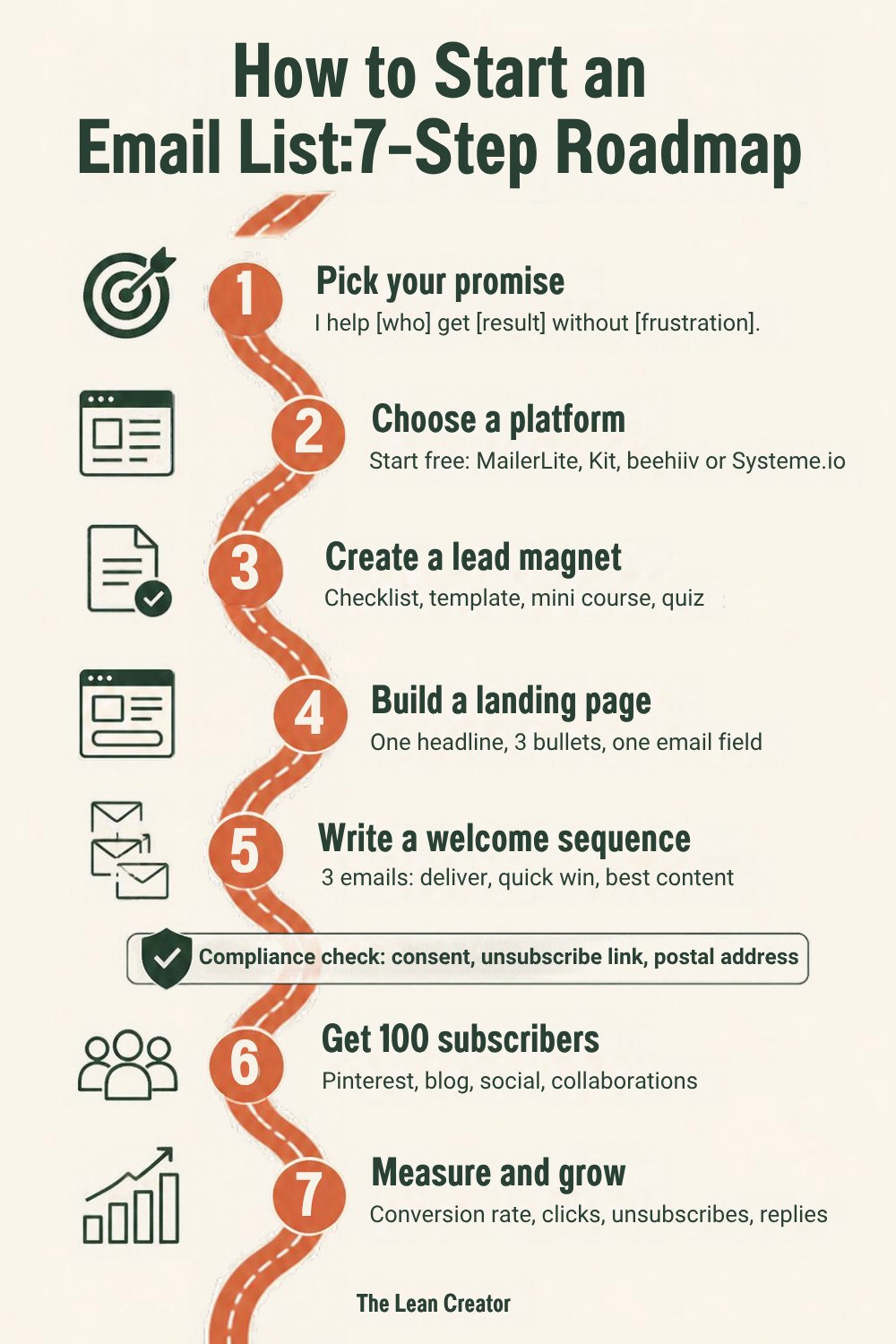
There's a short compliance check between Steps 5 and 6. It takes ten minutes, so please don't skip it.
Step 1: Write a one-sentence audience promise
People don't join "a newsletter." They join because you promised to help with something specific. Use this template:
"I help [specific person] [get a specific result] without [a common frustration]."
- "I help busy moms meal-prep a week of dinners in 90 minutes."
- "I help new Etsy sellers get their first 10 sales without paid ads."
- "I help beginner watercolor painters finish one small painting every weekend."
Narrow feels risky, but your freebie, landing page and welcome emails all come straight from this sentence.
Do this today: Write your promise down. If a stranger can tell in five seconds whether it's for them, you're ready.
Step 2: Choose a free email platform that can send a welcome sequence
An email platform stores your subscribers, hosts your signup page and sends your emails, with the unsubscribe link and consent records your personal inbox lacks.
Here's the trap most guides skip: a free plan that holds plenty of subscribers can still leave you sending every welcome email by hand.
Which free plan sends an automated welcome sequence?
| Free plan | Free up to | Automated welcome sequence? | First paid step (monthly billing) |
|---|---|---|---|
| MailerLite Free | 250 subscribers | Yes: 3 automations included | Comfort: $12/mo up to 500 subscribers |
| Systeme.io Free | 2,000 contacts | Yes, one: 1 email campaign plus 1 automation rule | Startup: $17/mo up to 5,000 contacts |
| Kit Free | 10,000 subscribers | No: broadcasts only | Creator: $39/mo up to 1,000 subscribers |
| beehiiv Free | 2,500 subscribers | One welcome email, not a sequence | Lite: $59/mo up to 1,000 subscribers |
| GetResponse Free | 500 contacts | No: automations save as drafts only | Starter: $19/mo up to 1,000 contacts |
Prices shown are monthly billing at the time of our last check. Please confirm on the official pricing page before you buy. GetResponse's free plan sits on a separate page, not its main pricing page, and it's the weakest fit here.
MailerLite
MailerLite
Best for: Simplest free welcome sequenceFree up to 250 subscribers
- Free plan
- 250 subscribers, 2,500 emails/mo
- Welcome sequence on Free
- Yes, 3 automations
- Next step up
- Comfort $12/mo (500) · $19/mo (1,000)
Per its pricing page, Free includes automations, a landing page and signup forms. That covers Steps 4 and 5 for $0.
Skip it if: you expect to pass 250 subscribers soon and don't want a bill when you do.
Systeme.io
Systeme.io
Best for: Most room on $0Free up to 2,000 contacts
- Free plan
- 2,000 contacts, unlimited emails
- Welcome sequence on Free
- Yes, one (1 campaign, 1 rule)
- Also on Free
- 3 funnels, 1 course, 0% transaction fees
- Next step up
- Startup $17/mo (5,000 contacts)
In Systeme.io, a "campaign" is an email sequence started by an automation rule. Free gives you one of each (and 1 tag), which is exactly one welcome sequence. See our Systeme.io review for the full limits.
Skip it if: you plan several freebies with separate sequences on $0.
Kit
Kit
Best for: Biggest free listFree up to 10,000 subscribers
- Free plan
- up to 10,000 subscribers
- Welcome sequence on Free
- No (sequences need Creator)
- Also on Free
- unlimited forms, landing pages and broadcasts
- Next step up
- Creator $39/mo at 1,000 ($33/mo yearly)
Kit's help center says the automatic confirmation email after a form signup can deliver your freebie. Emails 2 and 3 go out by hand until you upgrade.
Skip it if: you want all three welcome emails to send themselves without paying.
beehiiv
beehiiv
Best for: Newsletter-first writersFree up to 2,500 subscribers
- Free plan
- up to 2,500 subscribers
- Welcome sequence on Free
- One welcome email only
- Next step up
- Lite $59/mo at 1,000 ($49/mo yearly)
Every plan includes a single welcome email. Multi-step automations start on Lite (10 live automations).
Skip it if: you mainly want to deliver a freebie and sell a product, not publish a regular newsletter.
How we chose these tools
We compared what a zero-start creator needs first: subscriber cap, an automatic welcome sequence and the first paid step. Every number comes from vendor pricing pages or help centers (how we review). For larger lists, see the best email marketing platforms for creators.
Still torn? Answer five quick questions (or open the full-page quiz).
Do this today: Open one free account. Don't spend a week comparing; you can export your list and move later.
Step 3: Make a lead magnet in a weekend
A lead magnet is a free resource you give in exchange for an email address. "Join my newsletter" is a weak offer. "Get the 15-minute dinner checklist" is a strong one.
A good lead magnet is specific (it solves one problem from your promise), quick (a win in under 15 minutes) and connected (it leads toward what you'll sell later).
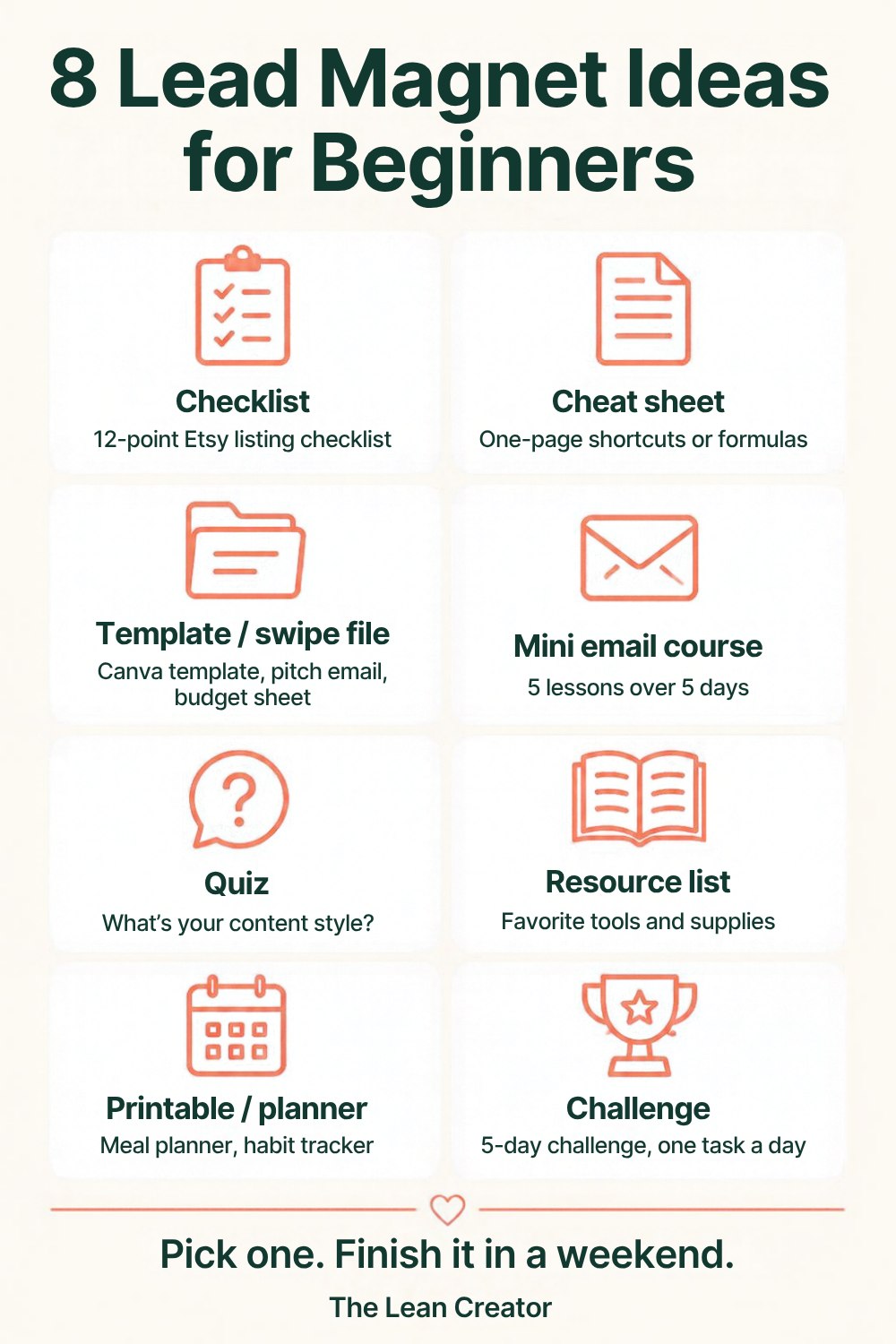
Printables, planners and checklists suit Pinterest especially well, because they look useful in a single image. A clean one-page PDF from Canva or Google Docs is plenty.
Do this today: Pick one format and outline it in 10 bullets. Finish it this weekend, not this month.
Step 4: Build a landing page (no website needed)
A landing page is a standalone page whose only job is to collect emails. Every platform in Step 2 lets you build one without code, and it gets its own link you can share anywhere.
- Headline: the result your freebie delivers. "Plan a week of dinners in 15 minutes."
- Subheadline: who it's for, from your promise.
- Three bullets on what's inside, plus a simple cover image.
- One email field and one button. "Send me the checklist" beats "Submit."
- What happens next: "You'll also get my weekly tips. Unsubscribe anytime."
Leave out menus and extra links. One page, one goal.
Do this today: Publish the page, then sign up with your own email to test the whole flow.
Step 5: Set up three welcome emails (copy-paste templates)
New subscribers pay the most attention in week one. Paste these three emails into your platform, swap everything in [brackets] and set the delays.
Email 1: deliver the freebie (send immediately)
- Subject: Here's your [freebie name]
- Backup subject: [First name], your [freebie name] is inside
Hi [first name],
Thanks for joining! Here's your [freebie name]: [link to your freebie]
Quick intro: I'm [your name], and I help [who] [get result] without [frustration]. I started because [one-sentence reason].
What to expect: one email every [day of the week] with [one practical tip about your topic]. Short, useful, and you can unsubscribe anytime.
Before you go, one question: what's your biggest struggle with [topic] right now? Just hit reply. I read every answer.
[Your name]
P.S. If this landed in Promotions, drag it to your main inbox so the next one finds you.
Email 2: one quick win (send 2 days later)
- Subject: The [topic] mistake I see most
- Backup subject: Try this before your next [common situation]
Hi [first name],
When I started [doing the thing], I [relatable beginner mistake]. If that sounds familiar, you're in good company.
Here's the fix that helped most: [one specific tip in two or three sentences].
Try it this week. It takes about [number] minutes.
Want to go deeper? I wrote more about it here: [link to your best post, pin or video]
Talk soon,
[Your name]
Email 3: best resources and a soft next step (send 4 days later)
- Subject: Where I'd start with [topic]
- Backup subject: My 3 favorite [topic] resources
Hi [first name],
You've had your [freebie name] for a few days. How's it going?
Here's what readers find most useful when they're starting out:
- [Resource or post]: [one line on why it helps]
- [Resource or post]: [one line on why it helps]
- [Resource or post]: [one line on why it helps]
[If you have an offer:] When you want more help, [offer name] walks you through [result]: [link]
[If you don't yet:] I share new ideas on Pinterest every week: [link to your profile]
My next email arrives on [day]. See you then!
[Your name]
Do this today: Paste in Email 1 and set it to send automatically. Add Emails 2 and 3 this week.
Before you promote: email compliance basics
This isn't legal advice, just the basics every beginner should know.
- US (CAN-SPAM): The FTC's CAN-SPAM compliance guide asks for accurate sender details, honest subject lines, a valid physical postal address and a clear way to opt out, with opt-outs honored within 10 business days. A P.O. box registered with the USPS counts as an address, handy if you work from home.
- UK and EU (GDPR): The UK ICO's guidance on consent says consent has to be a clear, active choice. Pre-ticked boxes don't count, and you should keep records showing people agreed.
- Canada and Australia: Canada's anti-spam law (CASL) and Australia's Spam Act follow the same idea: get consent, identify yourself and include a working unsubscribe link.
In practice: only add people who signed up themselves, say what they'll receive, and link a simple privacy policy near your form.
Step 6: Get your first 100 subscribers
Your first 100 usually come from showing up in two places consistently, not one viral post. Pick two channels for 30 days. If your people are on Pinterest, make it one.
Pinterest: the channel that keeps working
Pinterest behaves like a visual search engine: people search for ideas and save them, and a pin can keep sending visitors long after you post it. That makes it a natural home for a freebie.
- Pin straight to your landing page, not your profile. One click from pin to signup.
- Make 3 to 5 designs per freebie, each with a different headline, to learn which promise people want.
- Go vertical. A 2:3 image (1000 x 1500 px) with one bold headline readable on a phone, which is also what Tailwind's pin design guide recommends.
- Lead with the freebie. "Free printable meal planner" beats your brand name.
- Use the words people search in pin titles, descriptions and board names.
- Add a fresh design each week rather than re-pinning the same image.
Five headline formulas to borrow:
- "Free [freebie] for [who]" → "Free weekly meal planner for busy moms"
- "How to [result] without [frustration]" → "How to plan dinners without a grocery-store meltdown"
- "[Number] [fixes or ideas] for [goal] + free checklist" → "12 Etsy listing fixes + free checklist"
- "Your first [milestone]: a free [number]-day plan" → "Your first watercolor painting: a free 5-day plan"
- "[Tool] for beginners: free printable" → "Habit tracker for beginners: free printable"
Other channels that work from zero
- Social media: put the landing page link in your bio and pin a post about the freebie.
- Your blog, if you have one: add a matching freebie to your top five posts.
- Collaborations: swap newsletter mentions with a creator of similar size, or offer your freebie on a guest post or podcast.
A simple 30-day plan
- Week 1: Publish your landing page, make 3 pins and share the link with your circle.
- Week 2: Add 2 more pins and update your social bios.
- Week 3: Pitch one collaboration or guest post.
- Week 4: Check which pin and channel brought signups, then make two more pins like the winner.
Do this today: Choose your two channels and make your first three pins.
What slow early growth looks like (and why it's normal)
Most guides leave this out. Your first weeks might bring a handful of subscribers, a few of them friends. Some weeks the number won't move, and it can feel like publishing into silence.
That's normal, not a verdict on your idea. Pins take time to be found, and you're still learning which promise lands. We won't quote a "typical" growth rate, because there isn't an honest one.
What to do anyway:
- Keep your send day, even when the number feels embarrassing. Ten readers who hear from you weekly beat 100 who forgot they signed up.
- Reply to every reply. Early subscribers who feel seen tend to stick around.
- Add one new pin a week, and change one thing at a time so you know what helped.
Your welcome sequence works the same for subscriber number 3 as for number 300. The system is ready before the crowd arrives.
Step 7: Measure what works, and upgrade only when you need to
Check four numbers once a week:
- Landing page conversion rate: signups divided by visitors. If it's low, test a new headline.
- New subscribers by source: which pin or channel brought them.
- Click rate: more reliable than open rate, which some email apps' privacy features distort.
- Replies: the most honest signal you'll get.
What happens when you outgrow the free plan
The real math at 1,500 subscribers with an automated welcome sequence, on monthly billing:
| Tool | Plan you'd need | Per month | Per year |
|---|---|---|---|
| Systeme.io | Free (up to 2,000) | $0 | $0 |
| MailerLite | Comfort, 2,500 tier | $33 | $396 |
| Kit | Creator, 3,000 tier | $59 | $708 |
| beehiiv | Lite, 2,500 tier | $79 | $948 |
Past 2,000 contacts, Systeme.io needs its Startup plan at $17/mo, which covers up to 5,000. If Kit's free broadcasts are enough and you're happy to send the welcome emails by hand, Kit stays $0 up to 10,000.
Try your own list size. The "if your list doubles" line shows what growth will cost before you commit.
Once your list is growing, start planning what you'll sell. A small digital product is a natural first step. Thinking about a full course? Our Thinkific vs Teachable comparison can help you pick a home for it.
Common beginner mistakes
- Waiting for a website. A landing page is enough.
- Spending a month on the freebie. One useful page beats a 40-page ebook nobody finishes.
- Picking a free plan that can't send a sequence, then forgetting emails 2 and 3.
- Adding contacts without consent, like phone contacts or LinkedIn connections.
- Going quiet after the welcome emails. Silent weeks make people forget why they joined.
FAQ
How much does it cost to start an email list?
You can start for $0 on MailerLite, Systeme.io, Kit or beehiiv. Your first real costs are usually a paid plan once you outgrow the free cap and, optionally, your own domain for a sender address.
Can I start an email list without a website?
Yes. Each tool in this guide gives you a free landing page with its own link. Share it on Pinterest, social media or in messages, and people can sign up without you building a site.
How long does it take to get 100 subscribers?
There's no honest single answer; it depends on your niche, your channels and how consistently you show up. Two channels, a clear freebie and a fresh pin each week is a solid 30-day start. Then double down on whatever brought your first signups.
How often should I email my list?
Pick a schedule you can keep. For most beginners, once a week is a comfortable rhythm. Tell subscribers what to expect in your first email and stick to it.
Can I add friends, family or past clients to my list?
Only if they've agreed to get your emails. Adding people without permission can break anti-spam rules and hurt your deliverability. Send them your landing page link and let them sign up themselves.
The bottom line
Write one clear promise, open a free account, make one useful freebie, publish a landing page and set up three welcome emails. Then show up in two places every week until you reach your first 100.
Want all three welcome emails to send themselves on $0? Pick the free plan that fits how far you expect to grow:
Want the simplest free welcome sequence? Start MailerLite →Free up to 250 subscribers
Want room to grow plus a funnel? Start Systeme.io →Free up to 2,000 contacts
You can switch tools later. You can't go back and collect the subscribers you didn't ask for.
What changed
- 2026-10-05 First published.