How to Build a Sales Funnel for Free: A Step-by-Step Guide for Solo Creators
Four or five pages, one welcome sequence and a tested checkout. Here's how to build all of it on a $0 plan, what to write on each page, and when $17 a month starts to make sense.
Heads-up: some links on this page are affiliate links. If you sign up through them, we may earn a commission at no extra cost to you. It doesn't decide our picks. Here's how we review.
You've made the ebook, the mini-course or the template pack. Now everyone says you "need a funnel," and every tutorial seems to assume a $97-a-month tool, a designer and an ad budget.
You can start without any of that. A sales funnel for a first product is four or five pages and one welcome sequence: a freebie signup, a delivery email, a sales page, a checkout and a thank-you page.
This guide shows how to build a sales funnel for free, step by step, on Systeme.io's free plan. You'll get what goes on each page, a sales page skeleton you can copy, a pre-launch test checklist, and the math on when paying $17 a month starts to make sense.
Quick answer: where to build your first funnel
- 1
Systeme.io Best $0 funnel builder
Free plan; Startup $17/mo
Pages, checkout, email and one course in one free account, with 0% transaction fees.
- 2
beehiiv Best if your newsletter comes first
Free up to 2,500 subscribers
beehiiv says it takes 0% of digital product revenue; Stripe's processing fee applies.
- 3
Teachable Best if the course is the whole business
From $39/mo; 0% platform fee from $89/mo
A course-first platform with a 7-day free trial and sales tax handling on every plan.
Prices checked Oct 2026. Plans change, so please confirm on each vendor's site.
On this page
- What a sales funnel is, in plain language
- The 5-page funnel for a first product
- Before you build: three things to sort out
- How to build a sales funnel on Systeme.io's free plan, step by step
- Sales page copy: a skeleton you can copy
- Pricing and order bump ideas
- Test your funnel before launch: a checklist
- How to get traffic to your funnel
- When to upgrade (with the cost math)
- Systeme.io: the free funnel builder we'd start with
- Other ways to build a funnel
- How we put this guide together
- FAQ
- The bottom line
What a sales funnel is, in plain language
A sales funnel is the path a stranger takes to become a buyer. It's called a funnel because more people see the first step than reach the last: many visit, some sign up, fewer buy. For a solo creator, it's a few linked pages plus a short email sequence:
- Someone finds you. A pin, a blog post or a newsletter mention.
- They swap their email for a freebie. Your opt-in page.
- You deliver the freebie and say hello. Your welcome email.
- They see your offer. Your sales page.
- They buy. Your checkout, with an optional add-on (an order bump).
- They get access. A thank-you page, plus a login or download email.
Why not just post a "buy now" link? Most people who find you aren't ready to buy that day. The opt-in keeps you in touch, so you can help first and make your offer later.
The 5-page funnel for a first product
Each page has one job. If a page is trying to do two, split it or cut one.
| Page | Its one job | What goes on it |
|---|---|---|
| 1. Opt-in page | Get an email address | A headline promising the freebie's result, 3 bullets, a freebie image, a form and a consent line |
| 2. Sales page | Explain the offer | The problem, the result, what's inside, who it's for, the price, a buy button |
| 3. Checkout (order form) | Take payment | Product, price, payment fields, an optional order bump |
| 4. Upsell (optional) | Offer one related extra | One offer, a "yes" button and a "no thanks" link |
| 5. Thank-you page | Confirm and point the way | Where access arrives, what to do first, how to get help |
The welcome email isn't a page, but it's the glue: it delivers the freebie and sends people back to the sales page later.
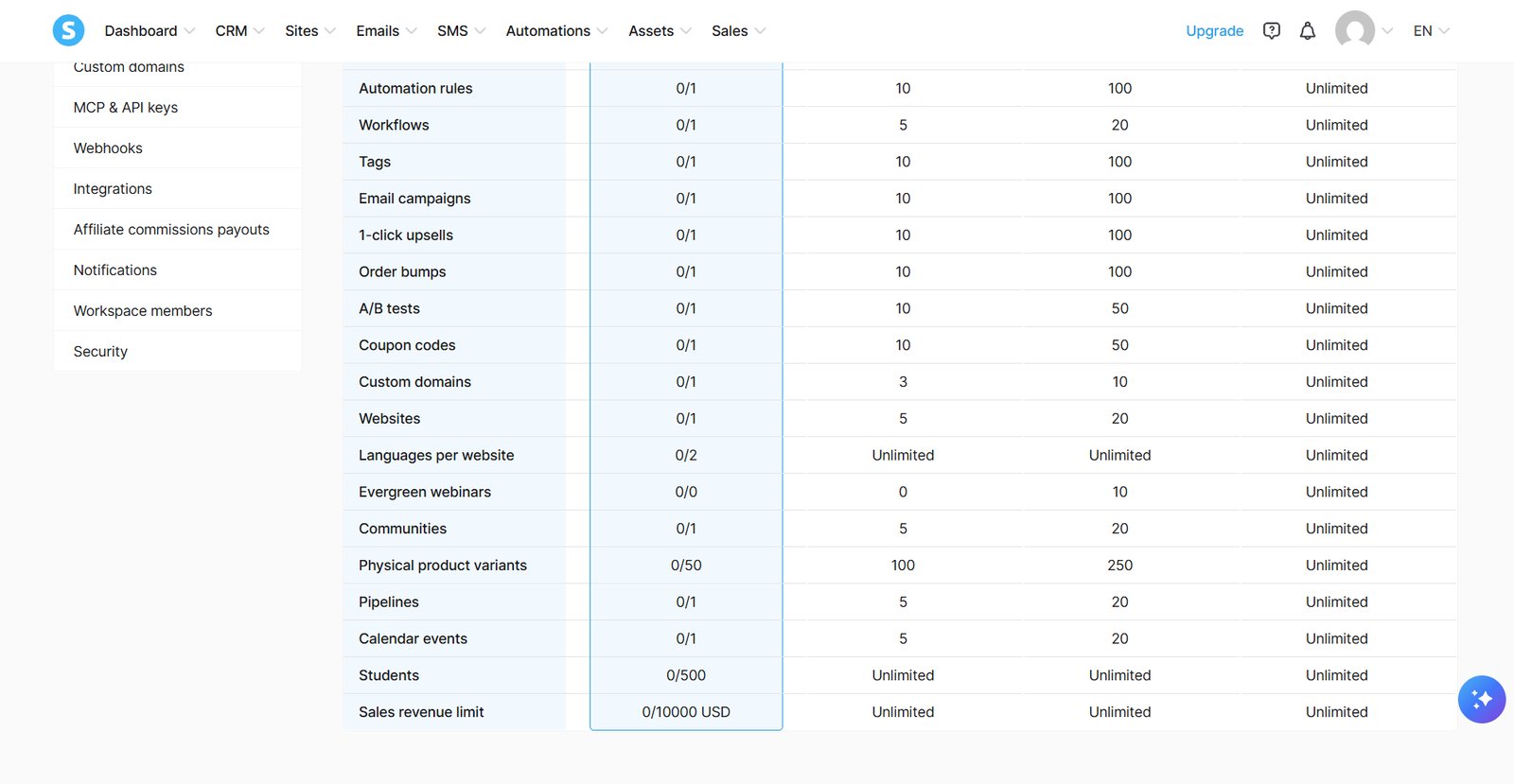
What this funnel uses on Systeme.io's free plan
| Item | This funnel uses | Free plan allows |
|---|---|---|
| Funnels | 1 | 3 |
| Funnel steps (pages) | 4–5 | 15 |
| Email campaigns (sequences) | 1 | 1 |
| Automation rules | Up to 1 | 1 |
| Tags | 1 ("lead") | 1 |
| Courses | 1 | 1 (500 students) |
| Order bumps / upsells | 1 each | 1 each |
| Contacts | Grows over time | 2,000 |
| Sales revenue | Your first sales | $10,000 (period not stated) |
Limits are from Systeme.io's plan data and the plan page in our free account. One funnel fits with room to spare; a second freebie with its own sequence doesn't (see when to upgrade). If you expect to sell more than $10,000 on Free, check with Systeme.io how that limit is counted before you launch.
Before you build: three things to sort out
- A sender email on your own domain. Systeme.io's help center says you can no longer send list emails from an @gmail.com address, and Yahoo is blocked by its own email policy. The free plan includes 1 custom domain.
- A payment account. Connect Stripe or PayPal. Systeme.io's pricing page says: "No transaction fees. Accept payments using Stripe or PayPal at no extra cost." Their own processing fees still apply.
- Your freebie and product files, finished. Our course templates guide can speed this up.
How to build a sales funnel on Systeme.io's free plan, step by step
Systeme.io's help center lists four funnel types: Build an Audience (starts with an opt-in page and a thank-you page), Sell (an order form and a thank-you page), Custom (a blank canvas) and an evergreen webinar funnel, "only available on Webinar and Unlimited plans."
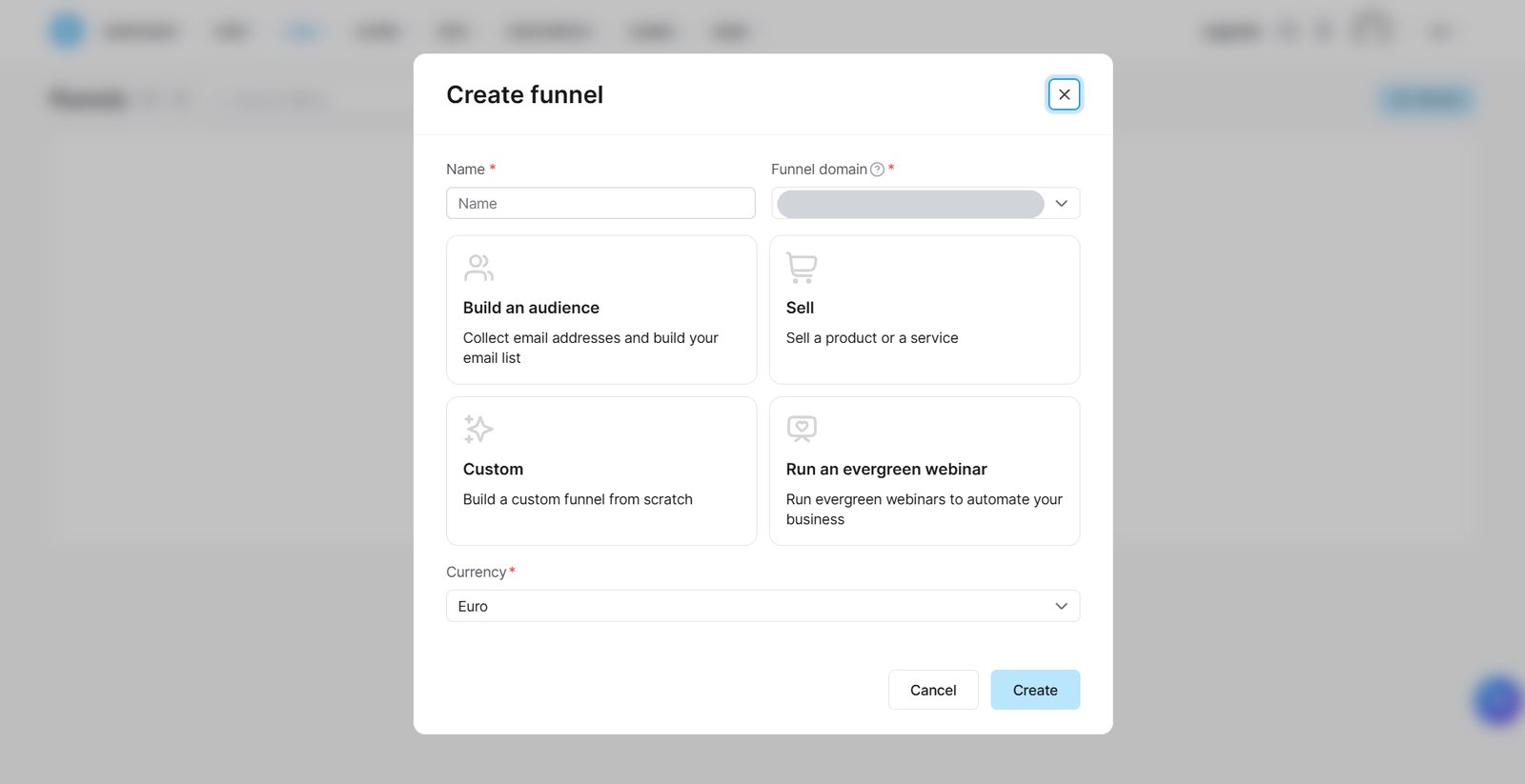
Start with Build an Audience or Custom, then use "+ Add step" to arrange the pages: opt-in, sales page, order form, upsell (optional), thank-you. The help center says the steps need to be in that order for the redirects to work.
Step 1: Build the opt-in page
- Pick a template. Make the headline the freebie's result: "Plan a week of dinners in 15 minutes," not "Free Meal Planner."
- Add three bullets on what's inside and an image of the freebie.
- Keep the form short: email, plus first name if you want to personalize.
- Add a consent line under the button (see the email rules box below).
- Set the button to submit the form, with the help center's "To the next step" redirect, so new subscribers land on your sales page.
Step 2: Deliver the lead magnet by email
Create your one email campaign as a welcome sequence:
- Email 1 (right away): the download link and one line on how to use it.
- Email 2: one useful tip related to the freebie.
- Email 3: a short story about the problem your product solves.
- Email 4: introduce the paid product and link to the sales page.
Use your one automation rule to connect opt-in signups to this campaign and your one tag ("lead"). Menu names change, so check Systeme.io's help center for the current clicks.
Step 3: Build the sales page
Use the copy skeleton in the next section, point every buy button to the order form, and check the page on your phone. Pinterest visitors in particular tend to arrive on mobile.
Step 4: Set up the checkout
- On the order form, create a digital product offer and set the price.
- Selling a course? The help center describes adding a resource to the product, choosing Courses, then the course and access type. Buyers get an email with instructions to set a password and log in.
- Selling an ebook or templates? Put the file in your one course slot as a single-lesson "course" so the same email delivers it, or link the download on the thank-you page.
- Add your one order bump if you have a natural add-on.
Step 5: Add a one-click upsell (optional)
Per the help center, "Once payment is validated, the customer is automatically redirected to the Upsell page." Accepting or declining leads on to the thank-you page (via a downsell, if you built one).
Step 6: Finish the thank-you page
Confirm the purchase, say where access arrives, name the first thing to do, and add a support email. Systeme.io shows a default page if you skip this, but a custom one is worth ten minutes.
Step 7: Test, then publish
Run the checklist below before you share a single link.
Build your funnel free on Systeme.io →Free plan: 3 funnels, 2,000 contacts, 0% transaction fees
Sales page copy: a skeleton you can copy
You don't need to be a copywriter. You need to answer a buyer's questions in the order they ask them.
Pricing and order bump ideas
There's no honest "typical" price. Price the result, check what similar products sell for, and consider a launch price for your list.
An order bump is a small, related add-on ticked on the checkout page. An upsell is a separate offer shown after payment. Systeme.io's free plan allows one of each, plus one coupon.
| Main product | Order bump idea | Upsell idea |
|---|---|---|
| Ebook or guide | A worksheet pack or checklist | A short video course on the same topic |
| Mini-course | A Notion or Canva template pack | A group Q&A session |
| Template pack | A video walkthrough | A bigger bundle |
Keep the bump obviously related, instantly deliverable and well below the main price, so it's an easy yes. Use your one coupon for a launch price your list gets first.
The fee math: Stripe's standard US card fee, as quoted by beehiiv, is 2.9% + $0.30. On a $27 product that's $0.78 + $0.30 = $1.08, so you keep about $25.92. On a $7 product it's $0.50, about 7% of the price, which is one reason to bundle small items.
Test your funnel before launch: a checklist
Go through this on your phone and a computer, as a stranger would.
- Sign up on the opt-in page with a personal email you don't use for the business.
- Check that email 1 arrives in the inbox (not spam) and the download link works.
- Click the unsubscribe link in one email and confirm it works.
- Confirm your postal address shows in the email footer.
- Check that the opt-in page redirects to the sales page.
- Click every button on the sales page. Each should open the order form.
- Buy your own product with a real card, or with a temporary full-discount coupon.
- Tick the order bump during one test to check it's delivered.
- Accept and decline the upsell in separate tests, if you built one.
- Check the thank-you page and the access or download email.
- Log in as the buyer and open the first lesson or file.
- Refund your test purchase from your Stripe or PayPal dashboard.
- Export a backup of your contacts.
How to get traffic to your funnel
Pick one main channel and give it a few months before adding another.
Pinterest. People search it for planners, templates and how-to guides. Make tall pins (we use 1000 x 1500 px) that lead with the result, link them to your opt-in page, and add new pins each week. Not a designer? See how to hire a freelancer on a budget.
SEO and a blog. Systeme.io's free plan includes 1 blog. Answer the questions your buyers search for and end each post with your freebie. It's slow to start but can keep sending visitors for a long time. Our guide on how to sell digital products shows how to find the phrases people use.
Your newsletter. An existing list is your warmest traffic: send the freebie, then the launch price. No list yet? Start with how to start an email list, and consider swapping mentions with a creator in a neighboring niche.
When to upgrade (with the cost math)
The free plan holds 2,000 contacts, but most solo creators hit something else first:
| You want to… | Free plan limit | Startup ($17/mo) |
|---|---|---|
| Add a second freebie with its own emails | 1 campaign, 1 tag | 10 of each |
| Email buyers separately from leads | 1 tag, 1 automation rule | 10 of each |
| Sell a second course | 1 course | 5 courses |
| Pass 500 students | 500 students | Unlimited |
| Build a fourth funnel | 3 funnels (15 steps) | 10 funnels (50 steps) |
| Grow past 2,000 contacts | 2,000 contacts | 5,000 |
What Startup costs: $17 a month ($204 a year), or $170 paid yearly, about $14.17 a month. Systeme.io calls that "2 months free."
When it pays for itself: at $25.92 kept per $27 sale, one sale a month covers Startup. The $47 Webinar plan (10,000 contacts, evergreen webinars) needs two.
Systeme.io takes no cut, so its cost stays flat as sales grow. Platform cost only (card processing applies on both):
| Monthly sales | Systeme.io Free | Systeme.io Startup | Teachable Starter ($39 + 7.5%) |
|---|---|---|---|
| $270 (10 × $27) | $0 | $17 | $39 + $20.25 = $59.25 |
| $1,000 | $0 | $17 | $39 + $75 = $114 |
Teachable's Builder plan ($89 a month) drops the transaction fee to 0%. Prices shown are monthly billing at the time of our last check. Please confirm on the official pricing page before you buy.
Systeme.io: the free funnel builder we'd start with
Systeme.io puts funnels, checkout, email, courses and a blog in one account with one contact list, so someone who opts in can buy and get course access without connecting apps.
Systeme.io
Best for: Solo creators building a first funnel on $0Free plan; Startup $17/mo
- Free plan
- 2,000 contacts, 3 funnels (15 steps), 1 course
- Transaction fees
- 0% (Stripe or PayPal fees apply)
- Email sends
- Unlimited on all plans
- Next step up
- Startup $17/mo, or $170/yr
Systeme.io says the free plan "never expires and does not require a credit card." With 500 students, 1 tag, 1 automation rule and 1 workflow, it suits one funnel but not several freebies. More in our Systeme.io review.
Skip it if: your business is mainly a newsletter, you need a team on one account, or you want design freedom beyond a template-driven editor.
What we like
- One free account covers opt-in, email, sales page, checkout and course
- 0% transaction fees on every plan, Free included
- Unlimited email sends on every plan
- An order bump, an upsell and a coupon to try on Free
- Startup at $17/mo lifts most limits to 10
Watch out for
- Only 1 email campaign, 1 tag and 1 automation rule on Free
- 1 course and 500 students on Free
- Needs a sender address on your own domain (no Gmail or Yahoo)
- Going over a limit can pause opt-ins, payments and course access
Weighing the best-known funnel tool? See Systeme.io vs ClickFunnels; ClickFunnels starts at $97 a month.
Other ways to build a funnel
- beehiiv, if your newsletter is the product. Free covers up to 2,500 subscribers, and beehiiv says it "takes 0% of your paid subscription and digital product revenue," minus Stripe's fee. Free includes a single welcome email; a multi-email sequence needs Lite ($59/mo monthly, $49/mo yearly, at 1,000 subscribers).
- Teachable, if the course is the whole business. Starter is $39 a month with a 7.5% transaction fee; Builder is $89 with 0% and built-in email marketing. 7-day free trial, no free plan.
- Kit, if email is the business. Free covers up to 10,000 subscribers with landing pages, forms and digital product sales; email sequences start on Creator ($39/mo at 1,000 subscribers).
- MailerLite, a free email tool with automations, a landing page and signup forms, up to 250 subscribers.
How we put this guide together
We opened a free Systeme.io account to check the funnel builder and plan page from the inside (the screenshots above are from it, October 2026). We also used Systeme.io's pricing page, plan data and help center, plus the alternatives' official pricing pages. We didn't run a test launch or measure conversion rates, so there are no success-rate numbers here. Our method is on how we review.
FAQ
Can I really build a sales funnel for free?
Yes, for one product. Systeme.io's free plan includes 3 funnels, 15 funnel steps, 1 course, 1 email campaign and 2,000 contacts, with 0% transaction fees. You'll still pay card processing on each sale, plus a domain for your sender email.
How many pages does a sales funnel need?
For a first product, four or five: opt-in, sales page, checkout, thank-you and, optionally, an upsell. Add a welcome sequence that delivers your freebie and links to the sales page.
Does Systeme.io take a cut of my sales?
No. Systeme.io's pricing page says "No transaction fees" on every plan, Free included. Stripe or PayPal still charge their processing fees.
Do I need my own domain to build a funnel?
For sending email, in practice yes. Systeme.io's help center says @gmail.com sender addresses are no longer allowed, and Yahoo is blocked too. The free plan includes 1 custom domain.
What happens if my funnel goes over the free plan's limits?
Systeme.io warns you for 3 days, then restricts the account until you upgrade or remove the excess. During a restriction, opt-ins and payments stop, so upgrade before a launch if you're close.
The bottom line
A first sales funnel is smaller than it looks. Build the five pages and the welcome sequence in order, test it as a stranger, then point one traffic channel at the opt-in page.
Systeme.io's free plan covers all of it for one product, with 0% transaction fees. When a second freebie or course arrives, Startup at $17 a month lifts those limits, and one $27 sale a month covers it.
Build your funnel free on Systeme.io →No credit card needed, according to Systeme.io
Newsletter first? Look at beehiiv. Course is the whole business? Compare Teachable.
What changed
- 2026-10-11 First published.